[ENG] Oh Bother - We got hacked again
You’ve probably heard about honeypots. But if you work in a corporate environment, you’ve probably never used one. Why is that?
Defensive (Blue) teams deploy various tools on their networks. EDRs, NGFWs, IPS/IDS solutions, all of them have one common pitfall - they generate a lot of data. That might not sound like a bad thing, but it leads to situations where alerts are ignored because “that’s probably just a false positive”, “one of the yara rules has an empty string as a match”, and others.
In many cases, these tools are not used to detect active attacks, but are used to perform a “post mortem”, to figure out what happened on that one subnet that apparently wasn’t behind a firewall last month.
“There’s no problem too big that a little honey can’t solve.” ~ Winnie the Pooh
Honeypots and other deception tactics are different. They are designed around the idea that you can place a very “delicious” looking component somewhere in your system, which has no legitimate use. That means, that if something weird is happening on it you can be sure that you are, in fact, getting pwned right now.
Honeypots
The general idea? Deploy something that someone can easily “hack” into - and be alerted when they do. This is the most common type of decoy. It can be a standard Windows/Linux server, a NAS, a network switch, a web app, or basically any other system.
The Awesome-honeypots Github repo collects lots of cool plug ’n play projects that mimic things like MySQL databases or even SSH servers. Most of them are pretty old, but they can give a general idea of the possibilities.
OpenCanary
This is a very well maintained and reputable project. It has reasonable system requirements, and is packed full of features. Below you can see a fake login screen, created by its HTTP module. Check out their repository on Github.

T-Pot
One of the most interesting honeypot projects that I have found is T-Pot, which is still under development. It is easy to deploy and provides every possible honeypot service. I’d say its main issue lies in the system requirements:
- (…) The T-Pot installation needs at least 8-16 GB RAM, 128 GB free disk space as well as a working (outgoing non-filtered) internet connection.
- Download or use a running, supported distribution.
- Install the ISO with as minimal packages / services as possible (ssh required)
That’s quite a lot for a honeypot, but T-Pot includes additional tools like for example the entire ELK Stack, so I guess it can be slimmed down. I strongly recommend experimenting with it yourself, but here are some stats I gathered a few years ago by hosting T-Pot on Azure with a public IP address and every possible service enabled:


The obvious issue with honeypots is that they must be running all the time, which can sometimes be problematic due to costs or for other reasons. This is why the next section exists.
Canarytokens / Honeytokens
This is a much more interesting solution – canary tokens are tiny tripwires, which can be practically anything, like files, API keys, dummy credentials or even credit card numbers. The name comes from Canaries, little birds used in 20th century to detect carbon monoxide gas by the coal mining industry.
Here are some real-life examples of such tokens:
- Credit cards – valid credit card data can be placed in a password manager, if it gets breached and someone tries to use it, a notification is sent instantly. Without that we wouldn’t be able to detect this kind of breach in any other way.
- API keys – as described by Grafana, this token can be placed in a CI/CD config to later detect someone stealing secrets with trufflehog.
- MS Office file – ultra simple solution, a docx/xlsx file that triggers an alert once opened, filled with genuine-looking customer data, usually placed on an enterprise cloud drive.
- QR codes – a good physical option, it can be printed and hung on a wall in a secure location, and who knows, maybe it will catch some rare species like physical red-teamers.
One of the most popular vendors of this solution is Thinkst Canary, you can test their tool for free here: https://canarytokens.org. I do not know if this is the best solution available, but it’s the only one I’ve used, so feel free to explore other options!

The good news is that the code is open source on Github! It should only take a few minutes for you to distribute some files or API keys across your systems, while it costs essentially nothing. It’d say it’s 100% worth it.
How does a canarytoken notification work?
You might be wondering how on earth a docx file can send notifications when being opened. That’s a good question, and the answer short answer is ✨DNS Tunnelling✨. You can read a bit more about their approach here, but in simple terms:
- The file contains a tracking pixel, a tiny element, invisible to the user, which is embedded in the file.
- The pixel links to a remote server, owned by the creator of the tokenised file.
- When the file is opened, a DNS request is sent to resolve the domain name that hosts the pixel to an IP address.
- Once the IP is known an additional HTTP request is sent to retrieve the pixel.
Either the DNS or the HTTP request would suffice to recognise that the file was opened, but some networks can filter out specific HTTP/DNS packets. Having two ensures redundancy.


Honey Users
Creating a new user in your identity management solution like Active Directory is trivial and free (usually). To make the user a deception tool, configure an alert on every login attempt for the account and boom, you have another trap that can detect eg. password spraying attacks. It’s a good idea to plant the username of this user someplace where a potential attacker can get it (more easily than legitimate usernames).
You can even plant real passwords with real usernames to let attackers log in and observe them as Ross Bevington showed here - an expensive, but really cool experiment!
Three important rules to follow when creating honey users:
- Do not name the user “John Doe”, “Jan Kowalski”, “Jean Dupont”, or whatever name is used as a placeholder in your language.
- The account must not be used by anyone, any login attempt indicates confirmed malicious activity.
- It’d be nice to add the account to some real groups to make it look convincing, but do not assign it any sensitive permissions.
F4keH0und
Attackers may want to run tools like SharpHound once they establish a beacon in your network to enumerate the Active Directory structure. Their goal is to find edges, permissions or relationships between AD objects, and then abuse them for privilege escalation or pivoting.

An interesting example of a connection might be an administrator connected to a PC with HasSession link.
This could mean that the user has left their credentials on the system, which can later be stolen by the adversary.
F4keH0und helps find opportunities where such relationships can be planted to lure attackers.
How NOT to design deception tools
Deception systems have to be believable, and appear as ordinary (and perhaps older) systems, as opposed to the below host that I found on Shodan.
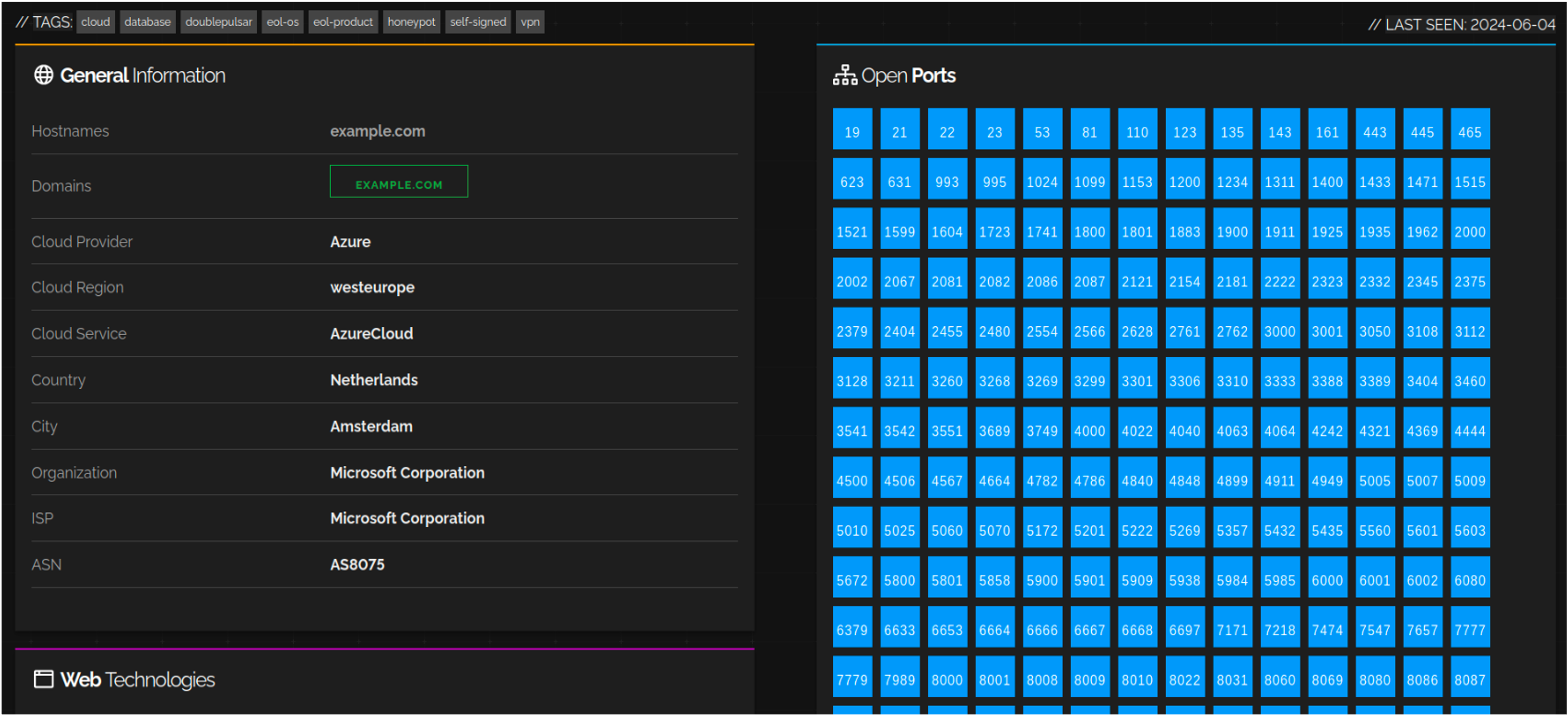
Example of a super duper ultra suspicious honeypot
This is why you should not have a:
passwords.txtfile on Desktop, it screams “trap” and therefore is not a good idea for a canarytoken.- file named
confidential.pdfwithrwxrwxrwxpermissions is too obvious. - Ubuntu 12.04 host is too ancient to not be considered a honeypot.
- Domain controller named
DC01-HONEYPOTis an extremely bad idea.
Honeypots and other deception elements should be carefully planned and strategically distributed, because an unrealistically large number of open ports will definitely alert an intruder, making them as stealthy as possible.
Every trap we deploy must be intriguing enough to make people want to interact with it. We have to balance making it seem normal with not making it obviously fake. A regular Windows machine can attract interest if it appears in a realistic context. At the same time, a honeypot server must be indistinguishable from production servers.

Alex, am I black with white stripes or black with white stripes?
You should heavily consider deploying deception tools on your network. At the very least, they will be another source of data that you can use to identify potential threats, and at their best they might just prevent another expensive incident to investigate.
Sources
- https://ww2.georgiasouthern.edu/research/researchintegrity/irb-faq/what-is-the-difference-between-active-and-passive-deception/
- https://github.com/tracebit-com/awesome-deception
- https://canarytokens.org/
- https://github.com/telekom-security/tpotce
- https://github.com/thinkst/opencanary
- https://github.com/DEF-CON-Group-420/F4keH0und